
Meta Ads leads notification system, webhook to Slack, WhatsApp and Email in 5 steps, no missed leads
The real problem, marketers aren’t aware of after the ads go live
In your business, you launch a new product, and for marketing, you are running a new Meta ad to collect leads with a total spend of Rs. 30,000. You set a sharp target audience and make attractive and quality ad creatives; everything looks great.
After running, a user clicks your ad and submits the lead on Monday.
Oh God, you just found it on Friday. For a business, it's actually an immersive gap. It may cause leads to be lost. Now you can understand where the real problem is. This isn’t related to targeting or budget, but silently, a late response time makes a big tragedy. Definitely, it’s not your fault because you manually check the ad manager on the weekend or at month-end.
Your complete pipelines may look like this:
A user fills out the Meta lead form from Meta Ads; it is set in Ad Manager, and no one notices it.
Until manual login, you and your team are not aware of new leads.
By the time a sales representative calls the client, they may have switched to another competitor.
But you wonder about your report, because the cost-per-lead will be fine, but the conversion rate is a question mark.
The slow follow-up may lose quality leads
A quick response is the gamechanger. If you respond quickly, then it will improve the conversion rate. In this blog, you can learn how to get this for your business. So that you don’t miss quality leads from Meta Ads for business.
What “Watching Your Leads” Actually Means
The solution for this isn’t complicated. You don’t need a dedicated person to watch leads from Ad Manager every hour. It'll be solved by a simple automation.
When a user submits their leads, such as name, mobile number, email, and other custom fields, it will automatically send to your Slack, WhatsApp, and email. There is no need for manual login and checking. Here’s the complete overall picture of the solution.
Meta provides the concept called a webhook that captures every event. It will fire every time a new lead submits the form. That pings your server with the lead event, not actual data. Then, from our backend side, we need to call the Meta Ads API to get the lead data from the lead id webhook returned. Then we need to format the raw data for sending as a notification. Then send this data through Slack, WhatsApp, and email APIs.
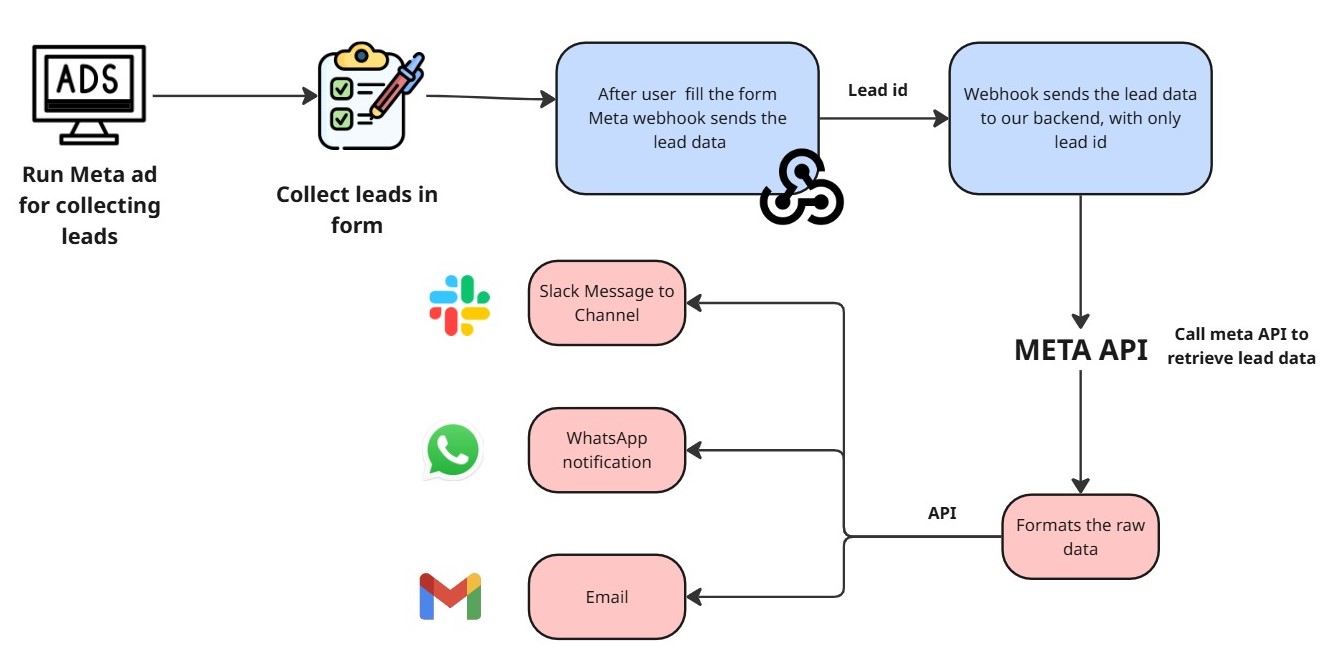
A step-by-step guide to make this possible
Step 1: Create your structured Meta Ads lead generation form
Firstly, create your Meta Ads lead form inside the Ad Manager. You should be deliberate about the fields you include in the form. These are the fields: name, email, phone number, and one or two qualifying questions may be enough to collect needed and structured leads.
A messy form will produce unwanted messy data. So be aware of what you need.
Note: Avoid using too many custom fields in the form. Because a long form can kill the conversion rate.
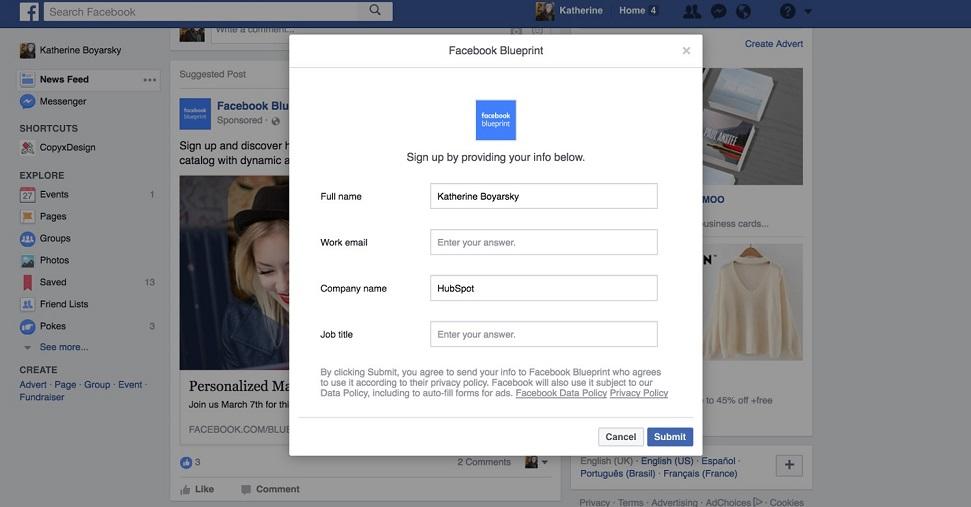
Step 2: Configure webhook subscription and Meta app
To receive the collected lead data first, you need to create a Meta developer app. That will be linked to your Facebook account and the Facebook page on which you are going to run an ad. Then, inside the Meta Developer Console platform, you need to subscribe your app and the leadgen webhook event.
Whenever a new lead is submitted, the meta notifies the webhook through the URL immediately. You need to point the webhook to your backend server. A simple HTTPS endpoint with a POST request hit from Meta.
Note: Most of the people subscribe to the webhook correctly but forget to link the app to the page on which the ad is running. If not, then you will not get notified if a lead is generated.
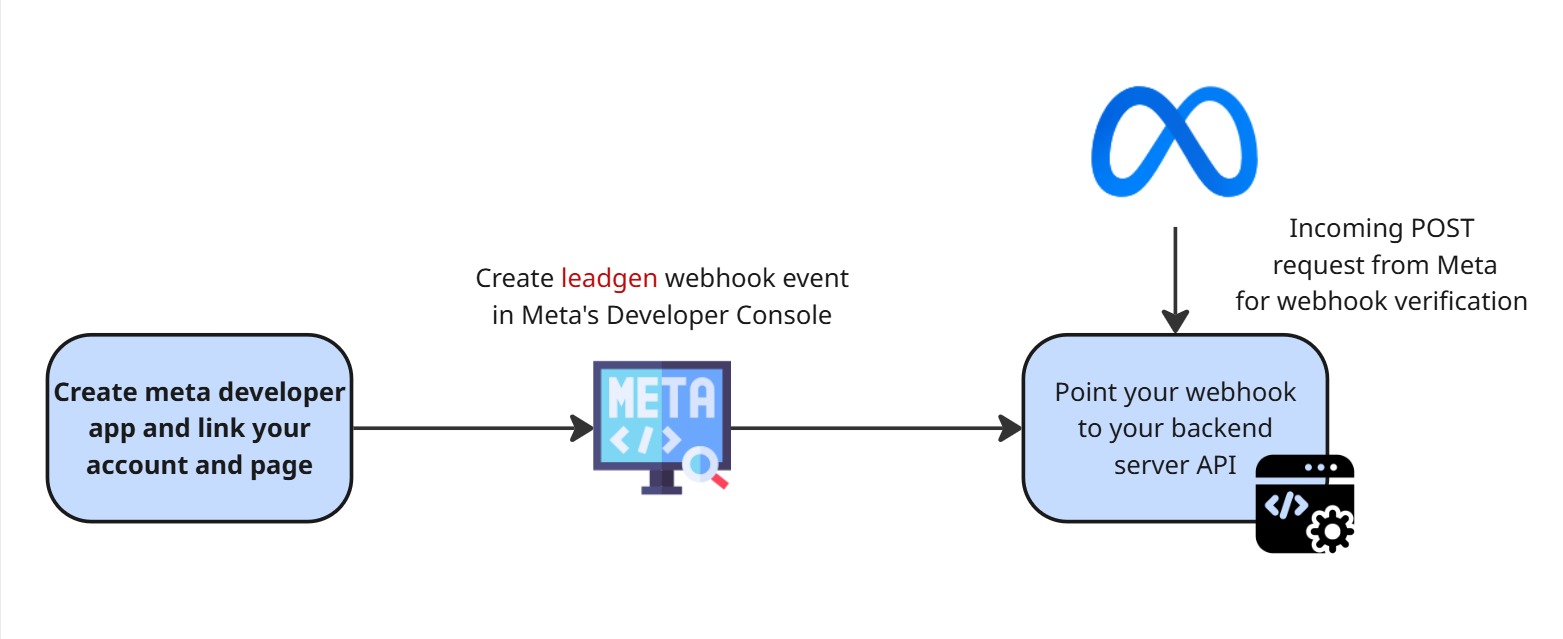
Step 3: To receive webhook leadgen event data, build a backend server
You need to develop a backend server code that does two things:
It verifies the webhook subscription (Meta sends a one-time challenge token for verifying whether the webhook is real, and you need to set verify_token before this).
Second, it receives the incoming lead notification payload from the webhook event.
The payload we get from the meta is very minimal, just the lead ID, ad ID, and form ID. We are not getting all the leads at the same time. We will receive data from Meta whenever the lead form is filled out by a user.
Before | After |
|---|---|
Before this setup, we manually open Ads | After this setup, we don’t need to wait for the |
Step 4: Call the Meta Graph API to retrieve the lead data and format the response.
After receiving the leadgen (lead) ID from the webhook, you need to do a single Graph API call to retrieve that particular lead data from Meta’s ads leads.
GET https://graph.facebook.com/v19.0/{leadgen_id}This returns the full form data like name, email, mobile number, and any custom answers. This data will be raw data; we need to format it for sending as a notification via other platforms. This API exactly fetches one lead's data. This approach is cleaner and faster. The formatted data will be like
New lead collected- Meta Ads lead name: John; Phone: +91 98XXXXXXXX; Email: john@work.com Campaign: Home Loan Enquiry - March 2026
Send this to the different APIs.
Step 5: Send the leads’ data to the Slack channel
At first, you have to configure the incoming webhook for the Slack channel for which you need to send lead messages. This Slack webhook directly sends the message to the specific channel.
The advantage of Slack notifications is that the lead will be sent immediately to the channel. So your team members can see it, and there's no need to wait for collecting it all after a few days. Whoever is available can respond to that.
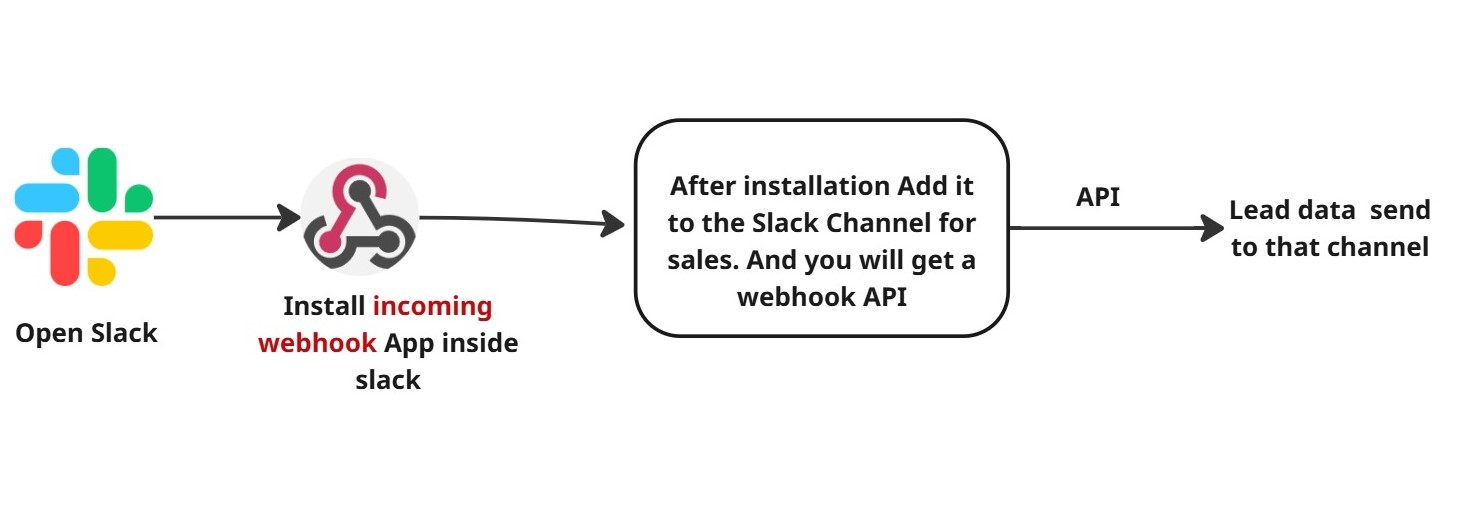
Step 6: Sending the meta ads leads’ data via WhatsApp Business API.
Nowadays, even small businesses run their sales through WhatsApp. This is the application that salespeople focus on more. So if we send a lead notification to the sales rep or the group chat, that will be a quick one. By using the WhatsApp Business API, you can send the pre-approved message templates to the rep or to the group chat.
Even if the sales representative is away from the office, other sales members in the group can respond to it immediately. So that they can get a notification and respond to the lead within a short amount of time.
Note: Before an API call, you need to verify whether the message templates are pre-approved for outbound notifications. If not, then build the message templates before go-live; usually, it takes 24 to 48 hours for approval.
Step 7: Send the meta ads lead’s data via Email with full lead details
Already, we have sent the lead data through WhatsApp and Slack APIs. If the sales member misses those, they can get them via their Gmail. It’s not for speed, but it helps with record-keeping and is a professional way.
This also acts as backup data. In case they miss the notification from Slack and WhatsApp, they can use the lead data gotten from email. Using the Gmail API, we can send an email to the sales rep.
An honest admission before building this system
If you are running a high-volume campaign, through this, you get hundreds of lead forms per day, and then it will be bottlenecked for you on your back-end side. But you can easily sort out this problem by using a queue-based backend (like Redis or AWS SQS).
So that your notifications don’t pile up or get dropped because of a heavy load. And another thing you should focus on. If your sales team members are from different time zones you’ll need to think about the notification timing. Because not everyone is working at 3 pm.
This setup explained here is perfect for small-to-mid-sized teams. Scale this according to your volume.
Conclusion
It is not useful or a big loss if your leads are not converted into customers, even if your ad brings more impressions and a higher conversion rate. Immediate response after the form submission, after a single lead, makes more success for your business.
From your campaign, the form filling is not an end game; it’s just a starting point. After ten minutes, determine whether the lead becomes a customer or just report data in the Meta Ads lead campaigns report.
Building a real-time system for this notification - Meta → webhook → backend → Slack channel or WhatsApp chat or group or email is not complex or luxurious. The tech part is possible within a day. The business case is simple: every meta-lead ad is an exterior, and the follow-up speed is the interior. Just start the foundation!
If you want to do an automation like this, just take a small trip to our product, Agentzee (https://agentzee.ai/). Here we build automation reports and workflows for businesses. You don't need to worry about the backend part.
Then, check out the analytics agent