

Google Ads report tool, how agencies automate daily client reporting with one Python script
If you are running a digital marketing agency and running Google Ads for approximately 15 clients, it is difficult to manage all clients’ performance reports. If you are looking for automation, then this will be your guide to implementing it. This tool for Google Ads reports saves hours, improves client trust, and scales your agency. It's like herding cats to manage several ad performances without an automated reporting system. Working harder isn't the answer. Developing a report tool system is the answer.
Picture this: It's 9 a.m., and one of your clients wants the performance status of their ad. Then you open the dashboard, navigate to their ad pages, analyze the data, manually store it, and send it to them. Yes, it’s a smooth process until all customers want it on the same day or at the same time. Each client expects transparency, ROI insights, and ad performance updates.
When a single client requests their ad performance details, it is manageable. But when all 10-15 clients want the performance report daily, it becomes time-consuming, inefficient, and difficult to switch accounts for 15 users and collect data manually. To automate this, you can implement the Google Ads report tool for your agency.
There's an improved method. After you've set it up you'll genuinely question how you could have done it any other way.
Let’s see how to implement the Google Ads report tool for an agency:
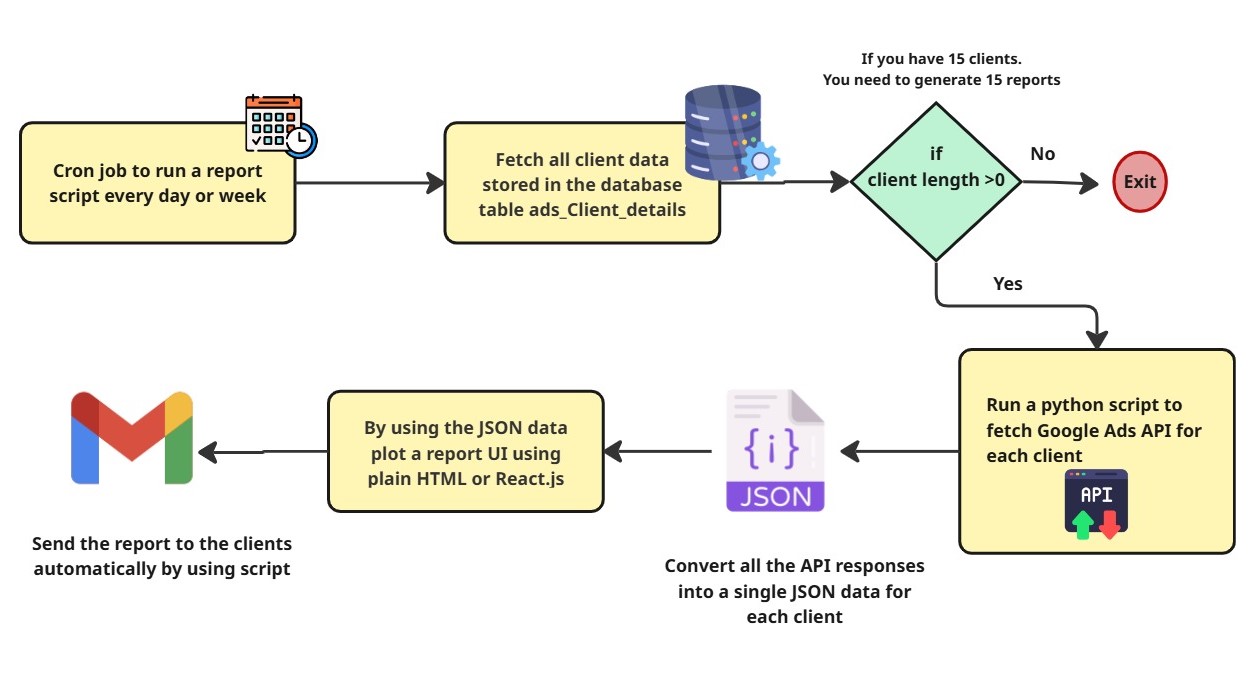
Before diving into the full system picture, let’s walk through what it is going to do:
Every day at a particular time, a cron job triggers a script. The Python script runs and gets all the client details from the database and loops through the data. Get all the client ad performance data through the API. Then, for each client, form a single JSON with their data and generate a UI report. Finally, send this report for each client via their email.
You need to follow step-by-step procedures to implement the tool for the Google Ads reports.
Cron job
DB to store all clients’ details
Hit the Google Ads API for getting each client's ad data
Form a single JSON with all retrieved data
Generate a report (UI)
Send it to the client
Repeat steps 2 - 5 for all clients. For this, you can write a simple Python script to loop through the client form DB. SO that you can get reports for all clients in just one script. This report tool automates your process for any number of clients.
How to get the Google Ads data through the API
The Google Ads report tool fetches data from the Google Ads account via API.
Step 1: Get the API access token for each client account
To get data from the Google Ads dashboard, we need an access token for all customers.
As an agency, you have one manager account (MCC - My Client Center) that sits above all clients’ Google Ads accounts. So that you can pull the data from each client's Google Ads account for the Google Ads reporting tool. Single credential for all 15 clients
To know how to set up OAuth and get an access token, refer to this blog How to access Google Ads Manager data via API with an access token.
After that,
Apply for the Google Ads API to fetch data from the dashboard by using the link https://developers.google.com/google-ads/api.
Then get your developer token (it might take a day or two to approve)
Step 2: Store client details in the database for easy access
You already have a database that is running for your agency - sounds good. Then add a separate table for storing your clients’ details.
The table should have at least these columns.
ID | Client | Google Ads | Report | Date of | developer | Access | |
|---|---|---|---|---|---|---|---|
1 | John | 32456789 | 21/02/2024 | ABcdeFGH….. | UAAjgh4kklk…. |
The ID you can obtain from the client or generate on your own is the Google Ads Customer Id. Additionally, you must give the client all of your credentials. This client will be associated with the manager's account ID.
Step 3: Some important metrics you can add to your Google Ads report tool script
Clients actually need transparent, meaningful, and detailed reports for their reference. You can create this in the Google Ads report tool through the API. Let’s see the important metrics you can add to the report.
For all APIs, you have to give the following details:
Replace each customer's CUSTOMER ID and ACCESS TOKEN.
Replace your MANAGER ACCOUNT ID and the developer token you generated
If you don’t have a MANAGER ACCOUNT, then just skip this line, "login-customer-id: MANAGER_CUSTOMER_ID,” in your API request.
1. Campaign Analytics
Complete campaign analytics with clicks, impressions, CTR, etc. It gives you the details of the campaign in which the client's ad is running. From this one API, you can get clicks, impressions, and all other data of the campaign.
curl -X POST "https://googleads.googleapis.com/v16/customers/CUSTOMER_ID/googleAds:search" \
-H "Authorization: Bearer ACCESS_TOKEN" \
-H "developer-token: DEVELOPER_TOKEN" \
-H "login-customer-id: MANAGER_CUSTOMER_ID" \
-H "Content-Type: application/json" \
-d '{
  "query": "
    SELECT
      campaign.id,
      campaign.name,
      ad_group.id,
      ad_group.name,
      metrics.impressions,
      metrics.clicks,
      metrics.ctr,
      metrics.average_cpc,
      metrics.cost_micros,
      metrics.conversions,
      segments.date
    FROM ad_group
    WHERE segments.date BETWEEN '\''2026-02-01'\'' AND '\''2026-02-28'\''
    ORDER BY segments.date DESC
  "
}'
The sample response will be
{
  "results": [
    {
      "campaign": {
        "id": "123456789",
        "name": "Search Campaign"
      },
      "adGroup": {
        "id": "987654321",
        "name": "Running Shoes Ads"
      },
      "metrics": {
        "impressions": "5400",
        "clicks": "320",
        "ctr": "5.92",
        "averageCpc": "1500000",
        "costMicros": "48000000",
        "conversions": "25"
      },
      "segments": {
        "date": "2026-02-20"
      }
    }
  ]
}
2. Device-Based campaign performance data
From this API, your clients clearly get the data on which device more people watch their ads on. Based on the device analysis, they can improve the quality of delivery based on the system type.
curl -X POST "https://googleads.googleapis.com/v16/customers/CUSTOMER_ID/googleAds:search" \
-H "Authorization: Bearer ACCESS_TOKEN" \
-H "developer-token: DEVELOPER_TOKEN" \
-H "login-customer-id: MANAGER_ACCOUNT_ID" \
-H "Content-Type: application/json" \
-d '{
  "query": "
    SELECT
      segments.device,
      metrics.impressions,
      metrics.clicks,
      metrics.ctr,
      metrics.cost_micros,
      metrics.conversions
    FROM campaign
    WHERE segments.date DURING LAST_30_DAYS
  "
}'
The sample response for the device-based data will be
{
 "results":[
  {
   "segments":{"device":"MOBILE"},
   "metrics":{
    "impressions":"12000",
    "clicks":"650",
    "ctr":"5.41",
    "costMicros":"45000000",
    "conversions":"40"
   }
  },
  {
   "segments":{"device":"DESKTOP"},
   "metrics":{
    "impressions":"8000",
    "clicks":"300",
    "ctr":"3.75",
    "costMicros":"22000000",
    "conversions":"18"
   }
  }
 ]
}
3. Search keyword performance data
This API provides you with a complete list of keywords for your campaign and the cost and clicks for each keyword. Based on this data, you can optimize each client's ad keywords according to the clicks for the campaigns. So, analyzing each client’s performance issue will identify it easily. If any keyword is missed you can add it or if any keyword is not relevant to the ad, you can remove it.
curl -X POST "https://googleads.googleapis.com/v16/customers/CUSTOMER_ID/googleAds:search" \
-H "Authorization: Bearer ACCESS_TOKEN" \
-H "developer-token: DEVELOPER_TOKEN" \
-H "login-customer-id: MANAGER_ACCOUNT_ID" \
-H "Content-Type: application/json" \
-d '{
  "query": "
    SELECT
      campaign.name,
      ad_group.name,
      ad_group_criterion.keyword.text,
      ad_group_criterion.keyword.match_type,
      metrics.impressions,
      metrics.clicks,
      metrics.ctr,
      metrics.average_cpc,
      metrics.cost_micros,
      metrics.conversions
    FROM keyword_view
    WHERE segments.date DURING LAST_30_DAYS
    ORDER BY metrics.clicks DESC
  "
}'
A sample response for a keyword search will be
{
"results": [
{
"campaign":{"name": "Search Campaign"},
"adGroup":{"name": "Running Shoes Group"},
"adGroupCriterion":{
"keyword": {
"text": "buy running shoes,”
"matchType": "BROAD"
}
},
"metrics": {
"impressions": "4500",
"clicks": "320",
"ctr": "7.11",
"averageCpc": "1,200,000",
"costMicros": "38400000",
"conversions": "28”
}
},
{
"campaign":{"name": "Search Campaign"},
"adGroup":{"name": "Running Shoes Group"},
"adGroupCriterion":{
"keyword": {
"text": "best sports shoes",
"matchType": "PHRASE"
}
},
"metrics": {
"impressions": "3800",
"clicks": "210",
"ctr": "5.52",
"averageCpc": "1,000,000",
"costMicros": "21000000",
"conversions": "15”
}
}
]
}
4. Total Revenue Data in Google Ads campaign (Conversion Value)
Clients can find high-performing campaigns, improve strategies, boost ROI, and generate significant returns by monitoring this entire income data. Data-driven budget allocation decisions are made possible by the information in Google Ads.
Using this information, a customer may calculate the exact return on investment (ROI), which helps them to distinguish between ads that are effective and those that are unsuccessful with low impressions and clicks.
Note: Revenue data is returned using the metric Conversion_value.
If in the result data metrics.conversions_value = 3200 then the total revenue is 3200
curl -X POST "https://googleads.googleapis.com/v16/customers/CUSTOMER_ID/googleAds:search" \
-H "Authorization: Bearer ACCESS_TOKEN" \
-H "developer-token: DEVELOPER_TOKEN" \
-H "Content-Type: application/json" \
-d '{
 "query": "
   SELECT
     campaign.name,
     metrics.conversions,
     metrics.conversions_value
   FROM campaign
   WHERE segments.date DURING LAST_30_DAYS
 "
}'
A sample response for total revenue data will be
{
 "results":[
  {
   "campaign":{"name":"Ecommerce Sales Campaign"},
   "metrics":{
    "conversions":"45",
    "conversionsValue":"3200"
   }
  }
 ]
}
5. Return on ad spend data
This return on ad spend data can be calculated by dividing the total revenue by the cost.
ROAS = Tota Revenue / Cost
This ROAS data in Google Ads allows clients to understand the optimization you took for the campaigns and better budget allocation for this, and it will increase the profitability. Based on this value, they can easily identify the campaign with high ROAS. So they can maximize ROI and improve targeting.
Through the API, we can’t get the direct ROAS value; we have to calculate it ourselves.
curl -X POST "https://googleads.googleapis.com/v16/customers/CUSTOMER_ID/googleAds:search" \
-H "Authorization: Bearer ACCESS_TOKEN" \
-H "developer-token: DEVELOPER_TOKEN" \
-H "Content-Type: application/json" \
-d '{
 "query": "
   SELECT
     campaign.name,
     metrics.cost_micros,
     metrics.conversions_value,
     metrics.conversions_value_per_cost
   FROM campaign
   WHERE segments.date DURING LAST_30_DAYS
 "
}'
ROAS will be calculated. → Conversion Value / Cost.
Here, cost = 50 currency units and conversion value (Total revenue) = 2500
Then, ROAS = 5 times return
A sample response for ROAS will be like
{
 "results":[
  {
   "campaign":{"name":"Ecommerce Sales Campaign"},
   "metrics":{
    "costMicros":"50000000",
    "conversionsValue":"2500",
    "conversionsValuePerCost":"5"
   }
  }
 ]
}
Step 4: Finally, form a single JSON with all metric values from the API response
The heavy lifting is over. Now you just form a JSON with all the data you got. In the Python script, just store the result in one JSON variable after each API call. So that we can form a JSON input that generates a complete report template using the Google Ads report tool.
Example:
{
	"report_title" : "Google Ads report",
	"Campaign_name" : "Client Acquiring Facial Ad",
	"date_range": "2026-01-23 -2026-01-29",
	"report_sections" : {
				"campaign_details" : {
						"clicks" : 234,
						"impressions" : 564",
						"ctr" : 456.77
					},
					"device_based_data" : {
							"Destop" : {
									"clicks" : 12,
								"impressions" : 10",
								"ctr" : 21.56
							},....
					},....
	}

}
For each API, form, section, and frame a report template.
Generating the report for each client's Google Ads
Pass the above single JSON as input to the UI generator. Using simple HTML or React.js, you can create a template. Just pass the JSON for each client; it automatically parses all sections and generates a complete UI template. This Google Ads report tool completely automates your process. Sample template:
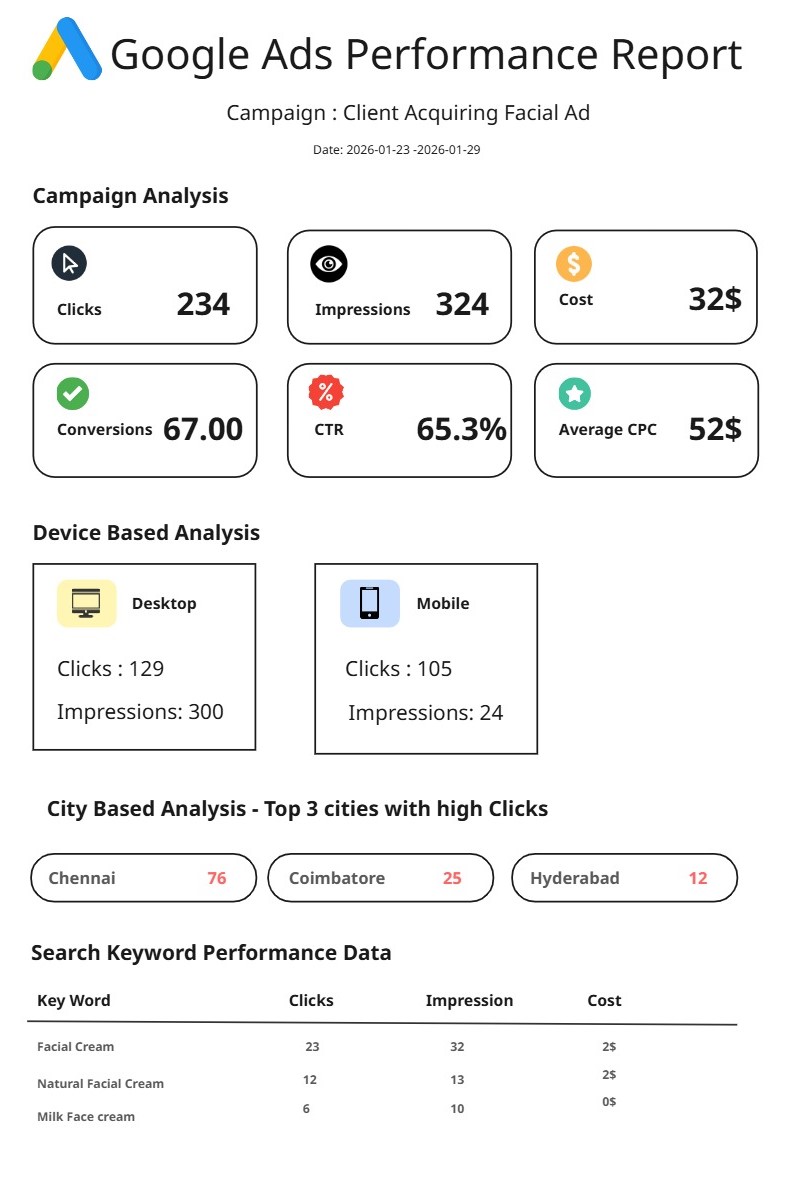
After generating this template, you can send it via the client's email ID. For each client, you can send it separately in just one script. It automates your work, and if you run the script at 9 a.m., then approximately all clients may receive their report template from the Google Ads report tool by 10.30 a.m. This tool reduces your burden.
Conclusion
Here’s the truth about where most of the agencies compete. You can’t hire a separate team just for this; automation will decrease your burden. Every day, a cron job runs, and all your clients get their ads’ performance report through your Google Ads report tool, and it will maintain a smooth relationship between you and them.
The complete automation setup is a one-time investment. The cron job doesn’t take holidays. The PDF never forgets to attach, and the email doesn’t automatically send to the wrong client. You will get the consistency and on-time delivery for every account, every day.
This reporting tool for Google Ads workflow gives you back the most valuable and trustworthy clients. This will give you more clients without breaking the ones you already have. You can use our pre-templated tool to generate all your reports at Agentzee (https://agentzee.ai).
Refer to our analytics agent